Note
Access to this page requires authorization. You can try signing in or changing directories.
Access to this page requires authorization. You can try changing directories.
Azure Local
Azure Arc
Azure Key Vault
Azure Monitor
Microsoft Defender for Cloud
This reference architecture describes a connected, hyperconverged Azure Local deployment that uses storage-switched networking. Azure Local is the infrastructure foundation for Microsoft Sovereign Private Cloud. This architecture provides workload-agnostic guidance for a highly available platform of 2 to 16 physical machines that hosts workloads such as Azure Local virtual machines (VMs) and Azure Kubernetes Service (AKS) on Azure Local.
Use this architecture when Azure provides the management plane and each machine contributes compute and local Storage Spaces Direct capacity. For storage-switchless deployments, see Azure Local hyperconverged storage switchless architecture. Rack-aware hyperconverged, multi-rack, small form factor, and disaggregated SAN-based deployments have different failure-domain, storage, and platform requirements and are outside this architecture's scope. Disconnected operations deployments use a local management plane and are also outside this architecture's scope.
Important
Azure Local supports single-machine deployments, but this architecture starts at two machines and doesn't cover single-machine deployments. A single-machine deployment has no destination for live migration or workload failover, so solution updates and host maintenance that require a restart interrupt workloads.
Article layout
| Architecture | Design decisions | Well-Architected Framework approach |
|---|---|---|
| ▪ Architecture ▪ Workflow ▪ Components ▪ Potential use cases ▪ Alternatives ▪ Deploy this scenario |
▪ Instance design choices ▪ Physical disk drives ▪ Network design ▪ Monitoring ▪ Update management |
▪ Reliability ▪ Security ▪ Cost Optimization ▪ Operational Excellence ▪ Performance Efficiency |
Tip
 This two-machine, storage-switched ARM deployment example demonstrates how to deploy Azure Local by using an Azure Resource Manager template (ARM template) and parameter file. This Bicep example demonstrates an Active Directory Domain Services (AD DS) based deployment with separate management, compute, and storage intents. Adapt its network configuration to match this architecture's converged management and compute design. For Terraform deployment options, see Terraform.
Architecture
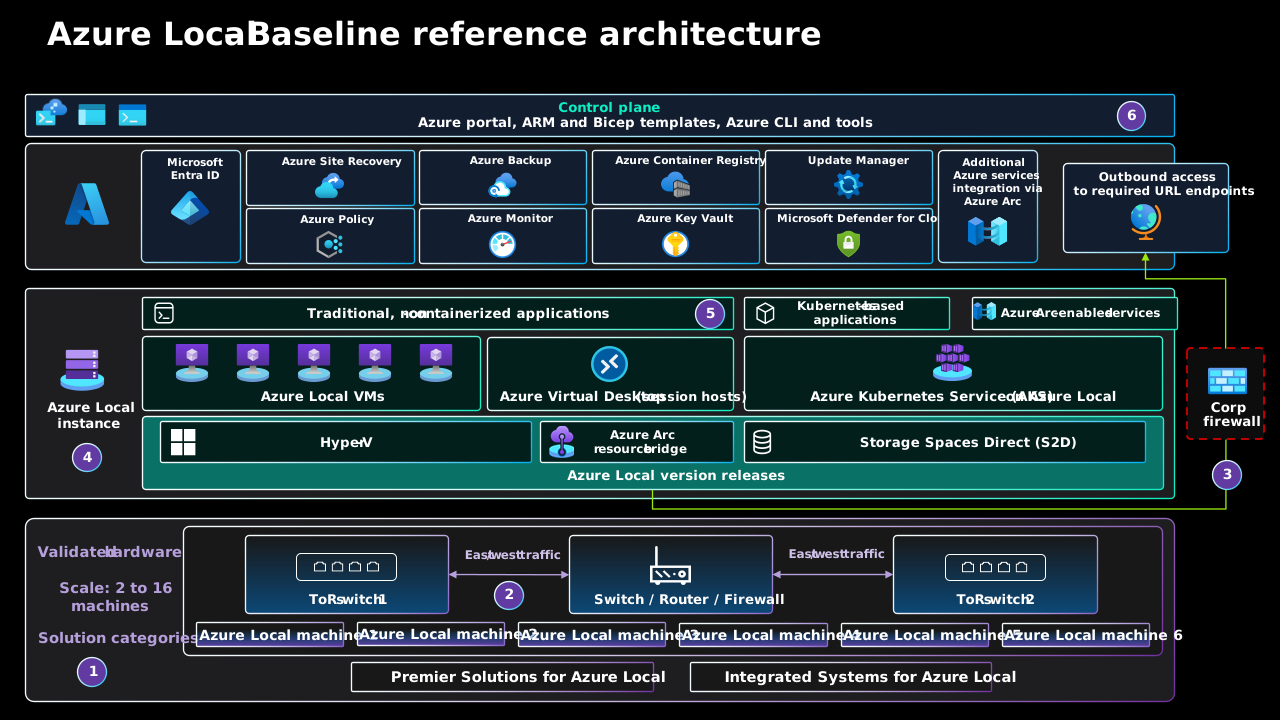
Download a PowerPoint file of this architecture.
The east-west arrows in this overview show traffic direction, not the storage forwarding path. Storage traffic stays on the dedicated Layer 2 storage networks through the top-of-rack (ToR) switches and their interconnection. This traffic doesn't traverse the upstream router or firewall. For the connection layout, see Physical network topology.
For more information, see Related resources.
Workflow
The numbers in the architecture diagram correspond to the following workflow:
Size, design, and procure the required hardware. Work with an original equipment manufacturer (OEM) or systems integrator (SI) partner to size the solution for the target workloads. For a new deployment, select a Premier Solution for Azure Local or an Integrated System for Azure Local. This baseline architecture and diagram cover deployments of 2 to 16 machines.
Rack, cable, and physically connect the hardware. Install the physical machines at the target location, either directly or through your partner. Connect each machine to both ToR switches for management, compute, and storage traffic. Connect the ToR switches to the upstream network and firewall infrastructure.
Establish outbound connectivity to Azure. Allow outbound access through the corporate firewall to the required URL endpoints. Register each Azure Local machine with Azure Arc so that you can use the Azure control plane for cloud deployment and ongoing management. For connectivity options, including Azure Arc gateway, see Outbound network connectivity.
Deploy the Azure Local instance. Cloud deployment configures the instance across the machines, including Hyper-V, Storage Spaces Direct, and Azure Arc resource bridge. Keep each instance within six months of the most recent Azure Local release to remain supported. For update paths and prerequisites, see Azure Local release information.
Run workloads and Azure Arc-enabled services. Host traditional, noncontainerized applications on Azure Local VMs and Azure Virtual Desktop session hosts. Host Kubernetes-based applications on AKS on Azure Local, and integrate supported Azure services through Azure Arc.
Manage the instance by using Azure and local tools. Use the Azure portal, Bicep templates, the Azure CLI, and Azure PowerShell to manage the platform and its Azure Arc-enabled resources. Where needed, use PowerShell and other supported local tools for on-premises operations. For deployments that are based on Active Directory Domain Services (AD DS), these tools can include Windows Admin Center. Windows Admin Center isn't supported for deployments that use local identity with Azure Key Vault. Use PowerShell or the Azure portal for those deployments. For Azure Local VMs, use local tools only for documented supported operations.
Components
This architecture has resources in an on-premises environment and management services in Azure. The Azure services remain cloud-hosted. Azure Local doesn't deploy Azure Monitor, Azure Policy, or Microsoft Defender for Cloud on-premises.
Platform resources
Azure Local runs on validated physical machines in your datacenter or edge location. In this architecture, 2 to 16 machines provide Hyper-V compute, Storage Spaces Direct capacity, and failover clustering for VMs and AKS on Azure Local.
Azure Arc is integral to the connected Azure Local control plane. It projects machines and workload resources into Azure Resource Manager. The Azure Arc resource bridge and custom location enable Azure-based lifecycle operations for Azure Local VMs and AKS clusters.
Azure Key Vault is required for both AD DS-based deployments and deployments that use local identity. It stores deployment secrets and platform credentials that Azure Local lifecycle operations require. For local identity deployments, it also backs up local identity secrets and recovery information. For more information, see the Azure local deployment prerequisites.
A cloud witness uses an Azure Storage account to provide an additional cluster-quorum vote. Azure Local cloud deployment configures a cloud witness for a two-machine instance. Instances with three or more machines don't use a cloud witness by default. Configure a cloud witness or file share witness for a three- or four-machine instance, as strongly recommended in the cluster-quorum guidance. A witness improves cluster quorum but doesn't override storage-pool quorum requirements.
Azure Update Manager orchestrates Azure Local solution updates. It places one machine at a time into maintenance mode and live migrates VMs when the instance has another suitable machine with enough capacity. Manage guest operating system updates as a separate workload responsibility.
Network ATC deploys and maintains the host-network configuration from network intents. In this architecture, it configures dedicated storage adapters and converged management and compute adapters consistently across the machines.
External infrastructure dependencies
Azure Local requires an identity provider configuration store. For an AD DS-based deployment, use a dedicated organizational unit with Group Policy inheritance blocked and a unique Lifecycle Manager deployment account for each instance. Azure Local also supports local identity with Key Vault. Use one key vault per instance, and validate support for your required management tools and workloads because compatibility differs from that of an AD DS-based deployment. Keep the identity and name-resolution services needed for deployment and recovery available independently of the Azure Local instance to avoid a circular dependency.
A DNS server resolves the records required by the machines and instance, and by the AD DS domain when you use AD DS-based identity. Use reliable time synchronization across the machines, identity infrastructure, and management infrastructure.
Customer-managed firewalls, proxies, and internet egress must provide outbound access to the required endpoints for Azure Local, Azure Arc, and the Azure management services that you enable.
Azure management services
Azure Monitor is an Azure-hosted observability service. Enable Insights for Azure Local to send health and telemetry data to Azure Monitor and apply data collection rules. Size log ingestion and retention for your operational requirements and budget.
Azure Policy evaluates Azure and Azure Arc-enabled resources for compliance. Use Azure Machine Configuration for supported guest configuration and use Azure Local drift control for the host security baseline.
Defender for Cloud is an optional Azure-hosted service. The Defender for Cloud integration with Azure Local is in preview. Evaluate its current support and coverage before adoption, and don't make a preview integration the only security-posture or threat-detection path for critical workloads. If the platform or workloads use AD DS, use Microsoft Defender for Identity, rather than the retired Microsoft Advanced Threat Analytics, to monitor identity-related threats.
Azure Backup provides optional workload protection. Protect Azure Local VMs by using Microsoft Azure Backup Server or a partner product whose current support matrix includes Azure Local.
Azure Site Recovery provides optional VM replication to Azure. Use the Azure Local integration to prepare the replication infrastructure from the Azure Local resource in the Azure portal. Then manage VM replication, test failover, failover, and failback from the Recovery Services vault.
Azure Container Registry is an optional Azure-hosted service for your application container images, not a required component of the Azure Local platform. If you deploy AKS on Azure Local, you can use a registry in Azure to build, store, and manage private container images that your AKS workloads pull.
Workload options
An Azure Local instance can host multiple unrelated workloads. This architecture doesn't require one instance per workload. Colocate workloads only when their security boundaries, compliance requirements, maintenance windows, and availability targets are compatible. Keep production and nonproduction workloads on separate instances. As a rule of thumb, use separate instances for mission-critical or sensitive workloads when sharing with lower-priority workloads would introduce unacceptable resource contention, administrative access, or correlated failure risk. On a shared instance, isolate workload networks and permissions, validate concurrent peak demand, and preserve capacity reserved for failures and maintenance. For more information, see Architecture strategies for consolidation.
The Microsoft Sovereign Private Cloud portfolio includes traditional and cloud-native workload options with different deployment and connectivity requirements. Design and operate each workload independently from the platform baseline. This baseline applies only when an offering supports the connected, storage-switched, hyperconverged configuration described here. Use the Azure Local workload documentation to identify current options and verify their prerequisites, availability, and connectivity support.
AI suite. AI workloads on Azure Local include Foundry Local on Azure Local (preview), Agentic Retrieval in Foundry Local (preview), and Azure AI Video Indexer enabled by Azure Arc.
Data suite. Options for local data processing include SQL Server and Azure IoT Operations. See the services used with hyperconverged Azure Local for links to their deployment guidance. Applications running on Azure Local can also connect to Azure Cosmos DB hosted in Azure. In that configuration, the database service processes and stores data in Azure, not on Azure Local. It doesn't provide local database processing or local data residency. Self-hosting open-source DocumentDB is a separate scenario from using the managed Azure DocumentDB service or Azure Cosmos DB. Before selecting a locally hosted database, verify its deployment procedure, availability, support model, and application API compatibility. Design data availability, protection, and recovery for the selected deployment.
Productivity suite. Microsoft 365 Local is a prescriptive, full-stack deployment type for Exchange Server, SharePoint Server, and Skype for Business Server. It isn't a workload that you enable on an existing Azure Local instance. Plan and deploy it by using a Microsoft 365 Local solution partner that's certified by Microsoft, on an Azure Local Premier Solution that meets its validated architecture and hardware requirements.
Bring your own apps. Azure Local VMs host traditional applications and services on Windows or Linux. Use AKS on Azure Local to run containerized applications.
Other workloads. Azure Virtual Desktop on Azure Local hosts session-host VMs. Azure provides the service control plane. GitHub Enterprise Local (preview) provides a self-hosted development platform on Azure Local.
These offerings evolve independently of this Azure Local hyperconverged baseline reference architecture. Evaluate their prerequisites, capacity, availability design, regional support, and preview or access terms separately. Don't use preview features for production scenarios.
Backup and disaster recovery are workload designs, not intrinsic instance capabilities. Back up every production workload and retain a recovery copy outside the Azure Local instance. Maintain at least one isolated or immutable copy, and protect its repository credentials separately from the instance and daily workload-administration credentials. For Azure Local VMs, use host-level backup for whole-VM recovery. Add guest-level or application-native backup when the workload requires application-consistent, point-in-time, or item-level recovery. Use Microsoft Azure Backup Server or a partner product whose current support matrix includes Azure Local, and test full restoration from the protected copy.
Backups don't provide rapid failover. Continuously replicate workloads whose recovery time objective (RTO) or recovery point objective (RPO) can't be met by restoring a backup. Prefer application-native replication for stateful workloads. For VM-level replication, use Azure Site Recovery for Azure Local when Azure is the recovery target. Use Hyper-V Replica when another Azure Local instance is the recovery target. After failover, the VM runs as an unmanaged VM on the target instance and can't be managed from Azure until you register it on the target and reconnect it to its existing Azure resource. For a temporary failover, you can defer registration and reconnection if you fail the VM back to its original instance within the Azure Arc reconnection window. You can't manage the VM from Azure while it runs on the target instance.
Potential use cases
Use this architecture for workloads that need:
An infrastructure foundation for supported Microsoft Sovereign Private Cloud solutions when requirements permit an Azure-hosted management plane.
Local compute and storage because of latency, data-residency, data-gravity, or intermittent wide-area network constraints, while Azure connectivity remains available for platform management.
A highly available virtualization platform for Azure Local VMs or AKS on Azure Local, with capacity to continue operating while at least one physical machine is unavailable.
Consistent deployment, governance, monitoring, and update operations across one or more on-premises or edge locations through Azure Arc and Azure management services.
This architecture doesn't by itself make a workload highly available. Deploy redundant workload instances and design backup and disaster recovery to meet workload recovery objectives.
Alternatives
Choose the Azure Local deployment model before you size hardware and design networking.
| Requirement | Deployment model |
|---|---|
| Hyperconverged storage, 2 to 16 machines, and the ability to add machines after deployment | Use this storage-switched baseline reference architecture. |
| A fixed three- or four-machine hyperconverged deployment that avoids storage switches | Use the hyperconverged storage-switchless architecture, which recommends three machines as the default topology. |
| Rack-level availability zones (fault domains) spread across two racks or rooms in close proximity | Evaluate an Azure Local rack-aware cluster deployment. |
| SAN storage and independent compute and storage scaling | Evaluate an Azure Local Disaggregated deployment. |
| Pre-integrated compute, storage, and networking across hundreds of machines | Evaluate an Azure Local multi-rack deployment. |
| Compact, Linux-based hardware designed for environments with limited space and power, such as retail, branch, and edge sites | Evaluate an Azure Local small form factor deployment. This deployment type is in preview. Review the preview terms and regional availability before you test or evaluate it. |
| Microsoft Sovereign Private Cloud requirements that prohibit use of the connected Azure management plane | Evaluate an Azure Local disconnected operations deployment. |
Rack-aware, disaggregated, multi-rack, small form factor, and disconnected operations require separate architecture guidance and aren't variants of this baseline.
Instance design choices
Understand workload performance and reliability requirements. For resiliency, understand the expectations for the platform and workloads to continue operating during hardware or machine failures. Also define RTO and RPO for your recovery strategy. Factor in compute, memory, and storage requirements for all workloads deployed on the Azure Local instance. Several characteristics of the workload affect the decision-making process:
Central processing unit (CPU). Consider architecture capabilities, including hardware security technology features, the number of CPUs, the gigahertz (GHz) frequency (speed), and the number of cores for each CPU socket.
Graphics processing unit (GPU). Consider workload requirements, such as for AI or machine learning, inferencing, or graphics rendering.
Memory. Consider the memory configuration of each machine and the amount of physical memory required by the workloads.
Machine count. Use 2 to 16 physical machines for this architecture. You can add machines to an existing instance, but permanently removing a machine (node) from an existing instance to reduce its machine count isn't supported. Account for this restriction when you plan capacity and growth. Don't use a single-machine deployment for workloads that require availability during platform updates or host maintenance.
Storage. Consider resiliency, capacity, and performance requirements.
Resiliency. Choose the volume resiliency type based on the number of machines, workload availability target, usable-capacity requirement, and failure scenarios. Three-way mirroring provides three copies and is available for deployments with three or more machines, but its capacity cost isn't appropriate for every volume.
Capacity. Consider the capacity, which is the total required usable storage after fault tolerance, or copies, is taken into consideration. This number is approximately 33% of the raw storage space of your capacity tier disks when you use three-way mirroring.
Performance. Consider the platform's input/output operations per second (IOPS), which determines the storage throughput capabilities for the workload when multiplied by the block size of the application.
Use Azure Local deployment-type guidance to select the deployment model and scale. Build a sizing model from the number and size of workload VMs, the vCPU count, memory, storage capacity, IOPS, throughput, and expected growth. Include capacity for platform services, storage resiliency, maintenance, and failure conditions. Use the Azure Local sizer to model these requirements and identify candidate validated hardware solutions. Review the output with the hardware provider or systems integrator, and use an OEM-specific sizing tool when one is available.
Apply these compute capacity recommendations:
Reserve at least one machine's worth of CPU and memory capacity across the instance for an N+1 design. This headroom helps ensure that you can apply solution updates by draining and restarting each cluster node one at a time without workload downtime. Account for CPU and memory overcommit when you validate this failure state.
For volumes that must remain online when two machines fail simultaneously, deploy at least four physical machines, configure a cluster witness, use a symmetrical storage layout, and use three-way mirroring. Reserve N+2 compute capacity so that the remaining online machines have enough CPU and memory to run the workload. In a three-machine instance, two unavailable machines cause the storage pool to lose quorum and its virtual disks to become inaccessible. Although one copy of the volume data remains on the surviving machine, sufficient compute capacity doesn't restore storage access. For more information, see Understanding cluster and pool quorum and Plan volumes on Azure Local and Windows Server clusters.
During cloud deployment, use the recommended automatic volume creation option (Express storage configuration mode) unless workload requirements justify an advanced volume design. If you create workload volumes manually, document the resiliency and capacity tradeoff for each volume.
For two-machine deployments that use two-way mirroring, storage tolerates one machine or drive failure at a time. If one machine is unavailable for maintenance or after a failure, a drive failure on the remaining machine can make affected volumes inaccessible. Compute headroom doesn't protect against this storage failure. Validate this limitation against workload availability requirements. For more information, see Volume resiliency with two servers.
For business- or mission-critical workloads on a two-machine instance, consider nested two-way mirroring only as an exception when an explicit availability requirement calls for continued storage access during a machine failure plus a capacity-drive failure on the surviving machine. Use separately designed, supported workload volumes, and document why this requirement justifies the additional storage cost and lifecycle complexity. Its four data copies provide 25% capacity efficiency: 75% of raw capacity holds redundant copies, before repair reserve and other overhead. For the standard hyperconverged deployment covered by this baseline, this nested two-way mirror layout requires exactly two machines, and you can't convert volumes in place to another resiliency type. If you plan to scale beyond two machines, include data migration to new volumes with a supported resiliency type, such as three-way mirroring, in your scale-out plan. Validate the volume design and migration sequence with your hardware provider or systems integrator, and keep platform-managed infrastructure volumes in their supported configuration.
For configurations with dedicated write-cache drives, nested mirroring alone doesn't protect against a cache-drive failure while the other machine is unavailable. Review the additional cache-drive protection requirements and their performance tradeoffs with your hardware provider. This consideration doesn't apply to single-media-type all-flash configurations without dedicated cache drives.
Keep enough Storage Spaces Direct capacity unallocated for in-place repair after a drive failure. Reserve the equivalent of one capacity drive per machine, up to four drives. For configurations that use NVMe, SSD, and HDD drives together, reserve the equivalent of one SSD and one HDD per machine, up to four drives of each type. Include this repair reserve, resiliency overhead, and forecast growth when you calculate usable capacity.
For a new hyperconverged deployment, start with an exact Premier Solution SKU and bill of materials from the Azure Local catalog that meets the Azure Local system requirements. Premier Solutions provide the highest level of partner integration and validation. If no Premier Solution meets a documented requirement, evaluate an Integrated System and account for the additional deployment, update, and support responsibilities. Have the hardware provider or systems integrator validate the final configuration against workload, failure-state, support, and lifecycle requirements.
Physical disk drives
Storage Spaces Direct supports multiple physical disk drive types that vary in performance and capacity. When you design an Azure Local instance, work with your chosen hardware OEM partner to determine the most appropriate physical disk drive types to meet the capacity and performance requirements of your workload. In general, examples from lower to higher performance include:
- Spinning hard disk drives (HDDs).
- Solid-state drives (SSDs).
- Non-volatile memory express (NVMe) drives.
- Persistent memory (PMem), which is also known as storage-class memory (SCM).
SSDs and NVMe drives use flash storage. Configurations that contain only SSD or NVMe drives are known as all-flash deployments.
The reliability of the platform depends on the performance of critical platform dependencies, such as physical disk types. Make sure to choose the correct disk types for your requirements. Use all-flash storage solutions such as NVMe drives or SSDs for workloads that have high-performance or low-latency requirements. These workloads include but aren't limited to highly transactional database technologies, production AKS clusters, or any mission-critical or business-critical workloads that have low-latency or high-throughput storage requirements. Use all-flash deployments to maximize storage performance. All-NVMe drive or all-SSD configurations, especially at a small scale, improve storage efficiency and maximize performance because no drives are used as a cache tier. For more information, see All-flash based storage.

The physical disk drive type influences the performance of your instance storage. The type of drive varies based on the performance characteristics of each drive type and the caching mechanism that you choose. The physical disk drive type is an integral part of any Storage Spaces Direct design and configuration. Depending on the Azure Local workload requirements and budget constraints, you can choose to maximize performance, maximize capacity, or implement a mixed-drive-type configuration that balances performance and capacity.
For general-purpose workloads that require large capacity persistent storage, a hybrid storage configuration can provide the most usable storage. For example, you could use NVMe drives or SSDs for the cache tier and HDDs for capacity. The trade-off is that spinning drives have lower performance and throughput capabilities compared to flash drives. These limitations can affect storage performance if your workload working set exceeds the cache capacity.
Storage Spaces Direct provides a built-in, persistent server-side cache. Its default behavior depends on the capacity drives: caching for flash drives, such as NVMe cache with SSD capacity, is write-only; caching for HDD capacity supports both reads and writes. Size and configure the cache to accommodate the working set of your applications and workloads. Storage Spaces Direct virtual disks, or volumes, are used in combination with Cluster Shared Volume (CSV) in-memory read cache to improve Hyper-V performance. This combination is especially effective for unbuffered input access to workload virtual hard disk (VHD) or Virtual Hard Disk v2 (VHDX) files.
Tip
For high-performance or latency-sensitive workloads, evaluate an all-flash storage configuration. In a single-media configuration, drives contribute to the capacity tier instead of reserving separate drives for cache. Resiliency, metadata, and reserve capacity still reduce usable capacity. Choose the machine count and volume resiliency based on workload availability, performance, and capacity requirements. For more information, see Plan volumes when performance matters most.
Network design
Network design is the overall arrangement of components within the network's physical infrastructure and logical configurations. You can use the same physical network interface card (NIC) ports for all combinations of management, compute, and storage network intents. Using the same NIC ports for all intent-related purposes is known as a fully converged networking configuration.
A fully converged networking configuration is supported, but the optimal configuration for performance and reliability is for the storage intent to use dedicated network adapter ports. As a result, this baseline architecture provides example guidance for how to deploy a multi-machine Azure Local instance by using the storage-switched network architecture with two network adapter ports that are converged for management and compute intents and two dedicated network adapter ports for the storage intent. For more information, see Network considerations for cloud deployments of Azure Local.
This architecture requires two or more physical machines and up to a maximum of 16 machines in scale. Each machine requires four network adapter ports that are connected to two top-of-rack (ToR) switches. The two ToR switches should be interconnected through multi-chassis link aggregation group (MLAG) links. The two network adapter ports that are used for the storage intent traffic must support Remote Direct Memory Access (RDMA). These ports require a minimum link speed of 10 gigabits per second (Gbps), but we recommend a speed of 25 Gbps or higher. The two network adapter ports used for the management and compute intents are converged by using Switch Embedded Teaming (SET) technology. SET technology provides link redundancy and load-balancing capabilities. These ports require a minimum link speed of 1 Gbps, but we recommend a speed of 10 Gbps or higher.
Physical network topology
The following diagram shows the physical connections for this multi-machine storage-switched architecture.

Apply these design recommendations:
Use dual ToR switches to avoid a network single point of failure and enable switch maintenance without workload downtime. Interconnect the switches according to the validated design.
Connect one adapter from each port pair to each ToR switch. Dedicate two RDMA-capable ports to storage traffic, and converge two ports for management and compute traffic by using SET.
Carry east-west storage traffic on dedicated VLANs. For a validated RDMA over Converged Ethernet (RoCE) design, configure the required data center bridging settings, including Priority Flow Control (PFC). An iWARP design doesn't require PFC.
Connect both ToR switches to the external network through an edge device, such as a firewall or router. Provide redundant north-south paths for management, workload traffic, and access to required Azure endpoints.
Logical network topology
The following diagram shows how this architecture separates and routes management, compute, and storage traffic.
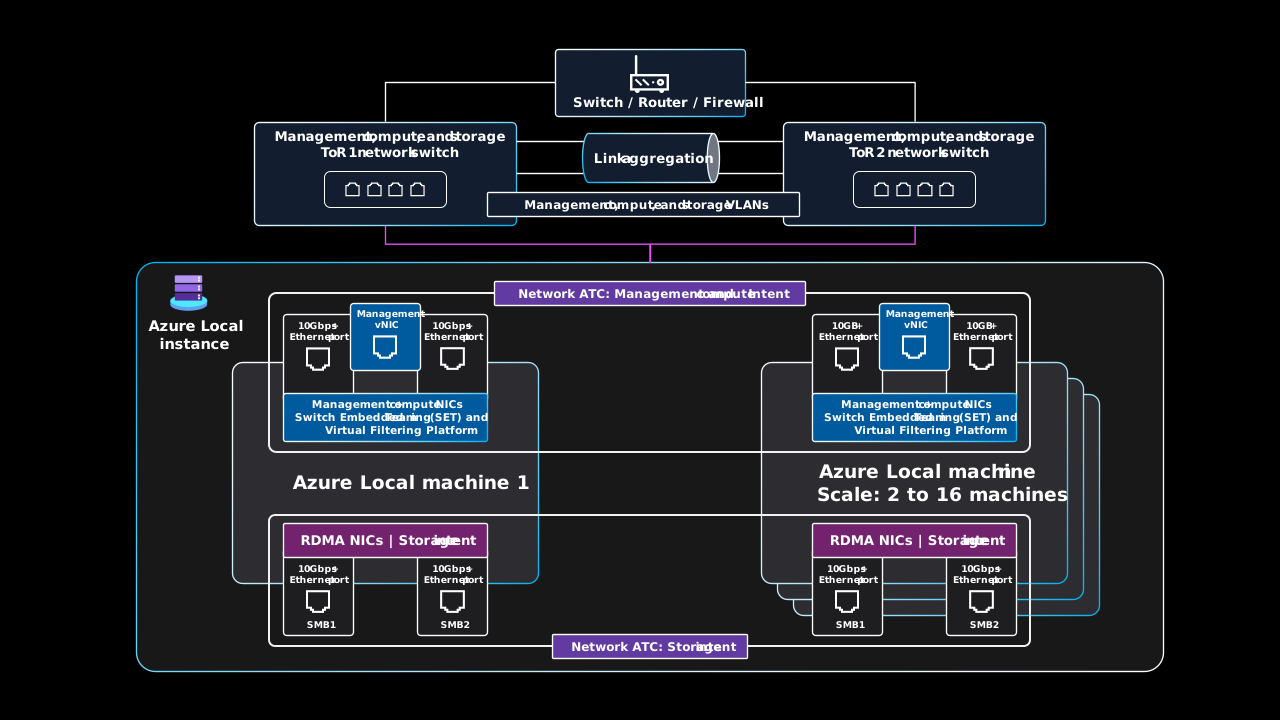
Apply these design recommendations:
Before deployment, configure both ToR switches with the VLAN IDs, maximum transmission unit settings, and data center bridging settings required for the management, compute, and storage ports. Follow the physical network requirements for Azure Local and the validated configuration from your switch vendor or systems integrator.
The Azure Local cloud deployment process configures Network ATC intents to assign physical adapters and apply the host configuration for management, compute, and storage traffic. Use the default settings unless the validated topology requires supported overrides.
Route management and workload traffic through the converged SET virtual switch. When the ToR switches provide Layer 3 routing, configure redundant paths from both switches to the edge firewall or router.
Create one or more Azure logical networks for workload traffic, and map each logical network to the VLAN ID configured on the physical network.
Connect the SMB1 and SMB2 storage ports to separate, nonroutable Layer 2 networks. Match their VLAN IDs to the corresponding ToR switch ports. The default storage VLAN IDs are 711 and 712.
Don't configure a default gateway on the storage intent adapters. Use SMB Direct over the dedicated RDMA ports and SMB Multichannel for storage-path resiliency.
Network switch requirements
Your Ethernet switches must meet the Azure Local requirements and applicable Institute of Electrical and Electronics Engineers (IEEE) standards. The storage network can use RoCE v2 or iWARP RDMA. RoCE requires the documented data center bridging configuration, including IEEE 802.1Qbb PFC for the storage traffic class. iWARP doesn't require PFC. The switches must support the VLAN, Link Layer Discovery Protocol, and other standards required by the selected validated topology.
If you plan to use existing network switches, review the mandatory network switch standards and specifications. When you purchase switches, select models validated for Azure Local from the current hardware catalog and solution guidance.
IP address requirements
In a multi-machine storage switched deployment, the number of IP addresses needed increases with each physical machine, up to sixteen physical machines within one instance. For example, if you want to deploy a two-machine storage switched configuration of Azure Local, the Azure Local infrastructure requires a minimum of 11 IP addresses. More IP addresses are required if you use microsegmentation or software-defined networking. For more information, see Review two-machine storage reference pattern IP address requirements for Azure Local.
When you design and plan IP address requirements for Azure Local, remember to account for extra IP addresses or network ranges needed for your workload, beyond the ones that are required for the Azure Local instance and infrastructure components. If you plan to deploy AKS on Azure Local, see AKS on Azure Local network requirements.
Outbound network connectivity
Outbound network connectivity is required for the physical machines, Azure Arc resource bridge appliance, AKS clusters, and Azure Local VMs if you use Azure Arc for guest operating system management. Their local agents and services connect to public endpoints for Azure and Azure Arc management and control plane operations. This connectivity enables operators to provision and manage Azure Arc-enabled resources through the Azure portal, the Azure CLI, or infrastructure as code, and to use services such as Azure Update Manager and Azure Monitor. The Azure Arc resource bridge and the instance's custom location direct workload resource operations to the target Azure Local instance.
During a temporary loss of Azure connectivity, the host infrastructure and existing VMs continue to run, but cloud-dependent operations aren't available and information in the Azure portal can become outdated. Azure Local must successfully sync with Azure at least once every 30 days. After 30 days without a successful sync, the instance is marked as out of policy and enters reduced functionality until connectivity is restored. Also, the Azure Arc resource bridge appliance can't remain offline for more than 45 days. An offline resource bridge prevents Azure Local solution updates and Azure-based workload lifecycle operations. After 45 days, its security key might no longer be valid or refreshable. Monitor both connectivity states and restore access before either limit is reached.
Before deployment, configure your firewall, proxy, or other internet egress controls to allow outbound access to the required public endpoints. This planning is especially important when you integrate Azure Local into a datacenter network with strict egress rules. Consider the following requirements:
Azure Local doesn't support SSL/TLS inspection on connections to required endpoints. For more information, see Firewall requirements for Azure Local.
For new deployments, consider using the Azure Arc gateway to reduce the endpoints that you must allow through your firewall or proxy. Some required endpoints remain outside gateway coverage. If you select Azure Arc gateway for this baseline, enable it during deployment. Azure Arc gateway support for Azure Local infrastructure and Azure Local VMs is generally available, but support for AKS on Azure Local is in preview.
Enabling Azure Arc gateway after deployment is in preview and requires Azure Local version 2610 or later. You can't disable the gateway after enabling it in this preview. Existing AKS clusters don't automatically receive the proxy changes. Validate their proxy settings, endpoint connectivity, image pulls, and workload health separately. Keep existing endpoint rules and connectivity paths available until gateway enablement and all validation checks succeed. Don't use preview features for production scenarios.
When you require a private connection from your site to Azure, evaluate the documented private-path network architecture. It uses ExpressRoute or site-to-site VPN to reach Azure Firewall explicit proxy, together with Azure Arc gateway. Required Azure public endpoints remain part of this design. Private endpoints for individual services require their own supported routing and private DNS configuration; this design doesn't make every Azure endpoint private. Keep Azure Arc Private Link Scope disabled on the virtual network that contains Azure Firewall. Follow the documented topology because Microsoft doesn't support variations of this private-path architecture. Migrating an existing instance to private path is in preview and requires version 2610 or later. Enable and validate Arc gateway before changing the proxy, and retain the existing connectivity path until end-to-end validation succeeds. Don't use preview migration for production instances.
When you deploy Azure Local by using a proxy server to control and manage internet egress access, review the proxy requirements.
Monitoring
Enable Insights for Azure Local to send supported health and performance telemetry to Azure Monitor and Log Analytics. Configure data collection rules, retention, workbooks, and alerts for your operational requirements. Monitor the external dependencies and workload health that Insights doesn't cover through their owning monitoring systems.
Define an end-to-end health model that maps facility, connectivity, platform, VM, AKS, and application signals to workload service-level indicators. Add VM monitoring and application telemetry for VM workloads. For AKS workloads, use Kubernetes monitoring, managed service for Prometheus, and workload telemetry where supported. Route each actionable alert to an owner and tested response procedure.
Operationalize the system health checks that Azure Local runs every 24 hours, even when no update is pending. Assign an owner to review Critical and Warning results, investigate the affected machines and remediation guidance, resolve the underlying issues, and rerun the checks to verify recovery. Critical results block solution updates. Warning results require remediation or an explicit decision to bypass. Review update readiness checks separately after update content downloads because they use validation logic from the target release and can produce different results.
On Azure Local version 2610 or later, use Get-SolutionHealthSummary to review failures from the most recent health check results. By default, it lists Critical and Warning failures. Check the reported source and timestamp: the command selects recent pre-update results when available for a scheduled update, or the latest daily system health results otherwise.
Update management
Manage Azure Local solution updates separately from workload guest operating system updates. Each has different components, validation requirements, maintenance windows, and recovery procedures.
Infrastructure updates
Use Update Manager for Azure Local to assess update readiness, apply solution updates, and review update history. Use the current Azure Local release information rather than assuming a fixed release cadence.
Starting in November 2026, monthly security updates provide OS latest cumulative updates and .NET updates during the same week as Patch Tuesday. On the latest Azure Local release, these function as security-only updates. On applicable older releases, installation also applies the required Azure Local updates to reach the target security release. Review the supported update path and resulting target version before scheduling the change.
Apply Azure Local solution updates within six months to remain supported. Azure Arc resource bridge also requires solution updates within one year to keep its internal certificates valid. Delaying updates beyond this period can allow these certificates to expire. For more information, see the certificate-expiration warning under Operational Excellence.
The solution update can include the operating system, agents, services, and a hardware-provider Solution Builder Extension (SBE) package. When the hardware provider integrates its drivers and firmware into SBE, the orchestrator coordinates their installation and required reboots within the update workflow. Maintain the firmware and driver versions in the validated hardware support matrix. Confirm the hardware provider's delivery and support process before procurement, and test the complete update on representative hardware before production rollout.
Use the supported solution-update workflow through Update Manager for the Azure Local resource or the documented PowerShell interface. Don't install host patches independently or run Cluster-Aware Updating manually. The update interfaces on individual Azure Arc machine resources, Windows Admin Center, SConfig, and third-party patching tools aren't supported for Azure Local infrastructure updates.
Before you select a target release, review its known issues, supported update path, and the hardware provider's Solution Builder Extension (SBE) release information. Inventory every AKS workload cluster and confirm that its Kubernetes version is supported by the target Azure Local release. If a version isn't supported, upgrade the workload cluster through each required Kubernetes minor version before you update the platform.
Use successful validation of the target solution update and SBE package on a representative nonproduction instance as a quality gate. Roll out the update to production instances in stages, starting with a representative lower-risk instance. After each update, verify platform health, storage and network redundancy, Azure Arc resource bridge health, and workload operation. Pause the rollout and investigate if health checks, workload service-level indicators, or performance targets regress.
Before each update, verify that the remaining available machines have enough CPU and memory capacity to run the workloads within their performance targets. Account for CPU and memory overcommit in this check. For an N+2 design, also verify that the machine count, witness configuration, storage layout, and pool quorum support the two-machine failure state. Update Manager places one machine at a time into maintenance mode and live migrates eligible VMs. This process can't preserve workload uptime on a single-machine deployment or when the remaining machines lack compatible capacity.
Workload guest operating system patching
Use a supported patch-management method for each guest operating system. Update Manager can assess and patch eligible Azure Arc-enabled servers. Define guest maintenance windows, reboot behavior, workload sequencing, and rollback separately from Azure Local solution updates.
Considerations
These considerations implement the pillars of the Azure Well-Architected Framework, which is a set of guiding tenets that you can use to improve the quality of a workload. For more information, see Well-Architected Framework.
Reliability
Reliability helps ensure that your application can meet the commitments that you make to your customers. For more information, see Design review checklist for Reliability.
Design each workload for its own availability and recovery targets. Platform clustering doesn't replace workload-level redundancy, backups, or disaster recovery. For more information, see Architecture best practices for Azure Local.
Define workload service-level objectives (SLOs), RTOs, and RPOs. Include planned maintenance and dependency outages in those targets. Platform availability doesn't establish an end-to-end workload SLO.
Perform a failure mode analysis across facilities, Azure connectivity, machines, storage, networks, VMs, applications, and operator actions. Identify correlated failures and single points of failure. Assign an owner, mitigation, detection signal, and validation test to each material failure mode. Repeat the analysis after material architecture changes, and remediate tests that don't meet the workload SLO, RTO, or RPO.
Recommended production baseline
The following example shows how to apply the recommendations. Contoso, Ltd., is a fictitious customer that runs production line-of-business services on Azure Local at its manufacturing sites. Its business and application owners set a 99.8% workload SLO and define an RTO and RPO for each service. The SLO is a workload target, not an Azure Local service-level agreement.
| Priority | Recommendation | Contoso, Ltd., decision |
|---|---|---|
| 1. Tolerate local infrastructure failure | For most production deployments, use at least three physical machines and reserve one machine's worth of CPU and memory capacity across the instance for an N+1 design. Use three-way mirror for volumes that require its failure tolerance. Use dual ToR switches, redundant network paths, and redundant power. Use a two-machine instance only when its capacity and failure-tolerance tradeoffs meet the workload requirements, and configure a cloud witness. Don't use a single-machine deployment for workloads that require availability during updates or maintenance. | Contoso deploys three physical machines at each site. It reserves one machine's worth of CPU and memory capacity across the instance and validates that the remaining two machines can run peak workload demand while one machine is unavailable. It uses three-way mirror, dual ToR switches, and independent power paths. |
| 2. Make each workload redundant | Run at least two instances of each production service when the application supports multiple instances. Place redundant VMs on different physical machines by using anti-affinity, and place their virtual hard disks on different storage paths when possible. Use application-native high availability for stateful workloads and health-aware traffic routing between redundant instances. A highly available VM can restart on another cluster node, but VM restart isn't continuous application availability. | Contoso runs each application tier on at least two VMs across different physical machines and storage paths. Its stateful services use application-native replication and failover, and health checks remove unavailable instances from traffic routing. |
| 3. Protect every production workload with backups | Use host-level backup for whole-VM recovery. Add guest-level or application-native backup for stateful data that requires application-consistent, point-in-time, or item-level recovery. Keep an isolated or immutable recovery copy outside the Azure Local instance, protect repository credentials separately from workload-administration credentials, set retention based on the workload RPO and compliance requirements, and test restoration. | Contoso uses host-level backup for each VM and application-native backup for databases. It retains an immutable copy outside the instance under separate backup-administration credentials and uses a documented retention schedule based on each workload's recovery and compliance requirements. |
| 4. Provide recovery from instance or site loss | Treat one Azure Local instance as one local failure domain. Continuously replicate workloads that can't meet their RTO or RPO through backup restoration. Prefer application-native replication for stateful workloads. For VM-level protection, use Azure Site Recovery for Azure Local for an Azure recovery target, or Hyper-V Replica for another Azure Local recovery target. With Hyper-V Replica, include registration and reconnection to Azure in the recovery plan if a failed-over VM remains on the target instance. For a temporary failover, document that the VM isn't manageable from Azure while it runs on the target, and fail it back to the original instance within the Azure Arc reconnection window. Replication complements backup because it can also replicate corruption or deletion. | Contoso uses Azure as the recovery target for manufacturing sites that have one Azure Local instance. It prepares the Azure Site Recovery infrastructure through the Azure Local resource in the Azure portal and enables replication for eligible VMs from the Recovery Services vault. It uses application-native replication for stateful services that need a lower RPO. |
| 5. Test the complete recovery path | Keep the selected identity services, DNS, time, network, and recovery infrastructure available independently of the instance. For local identity, include access to the Key Vault recovery secrets in the recovery procedure. Document workload startup order, network and DNS traffic redirection, failover, failback, and Azure resource reconnection. Set the recovery-test schedule based on workload criticality. For critical workloads, run an isolated disaster-recovery test failover at least monthly, and verify that measured recovery meets the workload RTO and RPO. Test backup restoration and machine maintenance with conditions that represent production. | Contoso runs a monthly isolated test failover for its critical business systems, including health-aware traffic routing and DNS redirection. It rotates backup-restoration tests across its other systems based on their criticality and records actual recovery time and recovery-point loss. Failed tests become tracked remediation work. |
For more information, see Recommendations for designing for redundancy and Recommendations for reliability testing.
Security
Security provides assurances against deliberate attacks and the misuse of your valuable data and systems. For more information, see Design review checklist for Security.
A secure foundation for the Azure Local platform: Azure Local is a secure-by-default product that uses validated hardware components with a TPM, UEFI, and Secure Boot to build a secure foundation for the Azure Local platform and workload security. When deployed with the default security settings, Azure Local has Application Control, Credential Guard, and BitLocker enabled. To simplify delegating permissions by using the principle of least privilege, use Azure Local built-in role-based access control (RBAC) roles, such as Azure Stack HCI Administrator for platform administrators and Azure Stack HCI VM Contributor or Azure Stack HCI VM Reader for workload operators.
Privileged Azure access: Require multifactor authentication and Conditional Access for privileged Azure operations. Assign roles at the narrowest practical scope, use time-bound elevation instead of standing access where possible, maintain separately protected emergency-access identities, and periodically review privileged assignments.
On-premises administrative permissions: For AD DS-based deployments, treat on-premises administrative permissions separately from Azure RBAC. Use a unique Lifecycle Manager deployment account for each instance, and delegate only the required permissions over the instance's dedicated organizational unit. Grant administrative access to the physical node operating systems by nesting a dedicated Active Directory group in each node's local Administrators group. Add to the dedicated Active Directory group only trusted operator accounts of users who have the skills and training to operate Azure Local. Protect and monitor the privileged account and group, and regularly review group membership.
Customer-owned management planes: Isolate administration of baseboard management controllers, switches, firewalls, backup systems, and facility-management interfaces from workload networks. Use separate privileged identities, restrict and monitor vendor remote access, apply supported security updates, manage certificate expiration and renewal, and send available security logs to an owned monitoring and response process.
Default security settings: Azure Local applies default security settings during deployment and enables drift control for the physical machines. The
AzureWindowsBaselineMachine Configuration assignment audits host compliance but doesn't configure or remediate settings. Local drift control enforces only the protected host settings. Apply separate secure configuration, endpoint protection, vulnerability management, and patching controls to workload guest operating systems and applications.Starting with version 2610, use
Set-AzsSecurityfor supported customization of individual baseline settings while drift control remains enabled. Prefer the-Clusterscope to record policy intent, apply the value consistently across machines, and preserve that intent through solution updates. Use the baseline settings list for the deployed version and identity model, and verify that upgraded deployments have applied the security baseline. Some settings block customization. Don't change protected settings through Group Policy or direct registry edits; drift control reverts those changes. For the supported workflow, see Customize individual security settings.Application Control lifecycle: Keep Application Control in Enforced mode. Add approved non-Microsoft software through a supplemental policy from the independent software vendor or one that you create through the supported workflow. If installation or validation requires temporary Audit mode, return every machine to Enforced mode after validation.
Credential lifecycle: Rotate Lifecycle Manager credentials, cloud-witness keys, service principal secrets, and infrastructure secrets only through the supported Azure Local secret-rotation workflows. Alert on expiration or suspected compromise, follow the procedure for the deployed software version, and verify platform operations after rotation.
Security event logs: Configure Azure Local syslog forwarding to send security events from every physical machine to your security information and event management (SIEM) platform. For production, use TCP with server authentication and TLS at a minimum. Use mutual certificate authentication where possible, and verify the configuration and event delivery on every machine.
Trusted launch for workload VMs: For supported Generation 2 Azure Local VMs, use Trusted launch with Secure Boot and a virtual TPM unless a documented workload constraint prevents it. Back up the VM guest state protection key as soon as you create the VM, and include key restoration in recovery procedures. Without the key, the VM can't start. Restoring a Trusted launch VM to a different Azure Local instance removes Azure Arc control-plane management. You must manage the restored VM by using supported local VM management tools. Azure Site Recovery doesn't support Trusted launch Azure Local VMs, so validate the workload backup and disaster-recovery design before you enable Trusted launch. VM live-migration traffic isn't encrypted. Protect it with network-layer encryption, such as IPsec.
Protection from threats and vulnerabilities: If you enable Defender for Cloud, configure the applicable plans for your Azure Local instance and supported workloads. Include the selected plans in the cost model.
Identity threat detection: Use Microsoft Defender for Identity to monitor supported AD DS signals and investigate identity-related threats. Microsoft Advanced Threat Analytics is retired and isn't part of this architecture.
Regulatory assurance: Map regulatory controls and evidence to the Azure Local platform, workload VMs and applications, external dependencies, and operational processes. Platform certification and security-baseline compliance don't prove that a workload meets its regulatory obligations. Retain the required evidence, and assign an owner, compensating control, and expiration date to each gap or exception.
Network isolation: Isolate networks as needed. For example, you can provision multiple logical networks that use separate VLANs and network address ranges. Allow only the network flows required by the deployed platform services, management tools, and workloads. Don't assume that management requires routed access from the management network to every workload VLAN. Azure Local VM guest management uses Hyper-V sockets and requires outbound connectivity from the guest to Azure endpoints. Validate the separate connectivity requirements for AKS, proxies, and other selected services before you restrict traffic. When you enable SDN on a supported Azure Local version, use network security groups to filter inbound and outbound traffic for Azure Local VMs. Associate a network security group with a logical network to apply common rules to its VMs, or with an individual VM network interface for workload-specific rules.
For more information, see Recommendations for building a segmentation strategy.
Cost Optimization
Cost Optimization focuses on ways to reduce unnecessary expenses and improve operational efficiencies. For more information, see Design review checklist for Cost Optimization.
For most deployments, validated hardware is the largest upfront cost. You purchase the machines, support contracts, ToR switches, optics, and replacement parts from hardware providers. Microsoft doesn't include these items in the monthly Azure charges. Build a total-cost model that also includes rack space, power, cooling, deployment services, workload licenses, and ongoing operations. Obtain current hardware and support quotations from the solution provider.
Size for the required failure state, not only normal utilization. N+1 or N+2 compute headroom increases hardware and licensing cost but prevents planned maintenance or a host failure from exhausting capacity. Compute headroom alone doesn't provide failure tolerance. Include machine count, witness configuration, volume resiliency, and pool quorum in the availability design. Reassess utilization and growth forecasts throughout the hardware lifecycle.
Azure Local uses a host service fee based on physical processor cores. For a representative three-machine hyperconverged deployment with 32 physical cores per machine and no external storage, price 96 physical cores at the L1 rate. Disaggregated deployments and hyperconverged deployments with external storage use the L2 rate, which has a different monthly fee per core. Azure Hybrid Benefit for Azure Local is available only to eligible L1 deployments and doesn't waive the L2 host service fee. Review current Azure Local pricing and your licensing agreement, including the separate pricing terms for OEM-licensed deployments with external storage. Don't add separate Azure Arc-enabled server charges for the Azure Local physical machines. AKS on Azure Local is included with Azure Local release 2402 and later.
The Azure pricing calculator doesn't currently include the Azure Local physical-core host service fee. Calculate that fee separately from the supporting Azure services in the Azure pricing calculator. Don't use the calculator's Azure Kubernetes Service on Azure Local item for deployments on release 2402 or later, because AKS is included with Azure Local.
Budget separately for optional or consumption-based Azure services. Important variables include Azure Monitor log ingestion and retention, enabled Defender for Cloud plans, backup capacity and retention, Key Vault operations, and data transfer. Include only services selected for your platform and workloads. The default Insights data collection rule collects five performance counters and two event channels, but its ingestion volume varies. Replace calculator assumptions with measured workspace ingestion and retention requirements.
Assign an owner and review cadence to the lifecycle cost model. Compare forecasts with measured platform utilization, hardware support, licensing, and metered Azure service costs. Update the growth forecast and use showback or chargeback where appropriate so workload owners understand their allocated platform and variable service costs.
Compare storage-switched and switchless total cost over the expected hardware lifetime. Switchless removes storage switches but increases NIC-port and cabling requirements and fixes the switchless machine count. Later add-node scale-out requires a storage-switched target topology, including the switches, optics, cabling, configuration, and maintenance window. Redeployment might be required when the target isn't a supported add-node scenario.
Operational Excellence
Operational Excellence covers the operations processes that deploy an application and keep it running in production. For more information, see Design review checklist for Operational Excellence.
Before procurement is finalized, run the standalone Azure Local Environment Checker validators that don't require the target hardware, such as connectivity validation, from a device in the target location. During cloud deployment, the integrated Environment Checker automatically runs the required validators on the actual machines and final network configuration. Resolve all blocking findings before you continue the deployment.
Deploy the first instance through the supported Azure portal workflow to validate organizational prerequisites and learn the deployment sequence. For repeatable deployments at scale, use source-controlled infrastructure as code and separate validation from deployment.
Apply change control to all production platform, dependency, and workload changes. Test and validate each change in a representative nonproduction environment before production approval. For example, Contoso, Ltd., uses a weekly change advisory board. Each submission includes an implementation plan or source-code link, a risk score, validation results, a tested rollback or recovery plan, post-release testing and verification, and clear success criteria. The board reviews this evidence before approving the change.
Maintain the complete validated solution. Coordinate Azure Local solution updates with the hardware provider's supported driver and firmware package. Test updates on representative nonproduction hardware, verify capacity for machine draining, and define rollback and escalation procedures.
Enable Insights for Azure Local and alert on hardware health, storage capacity and repair state, cluster health, update compliance, Azure Arc / resource bridge status, and required outbound connectivity. Monitor the selected identity services, DNS, time, switches, power, and other external dependencies through their owning systems.
Treat Azure Arc resource bridge as a critical management dependency. Don't manually delete its appliance VM or Azure resource. Unsupported deletion can leave stale service-side associations and disrupt workload deployment, solution updates, and Azure-based management. Monitor resource bridge health, and contact Microsoft Support before recovery or deletion. For more information, see Azure Arc resource bridge maintenance.
Warning
Prolonged delays in applying Azure Local solution updates can allow internal Azure Arc resource bridge certificates to expire. Expired certificates can prevent Azure-based workload management and solution update operations. Keep the instance within its supported six-month update window, and contact Microsoft Support for recovery assistance if certificates expire. Don't independently upgrade or redeploy the resource bridge. Azure Local manages its upgrade through solution updates. For more information, see internal certificate requirements and resource bridge upgrade guidance for Azure Local.
Keep an inventory of platform and workload ownership, support contracts, firmware baselines, network configurations, certificates, service accounts, recovery credentials, and replacement-part lead times. Exercise machine replacement, switch maintenance, secret rotation, backup restoration, and site recovery procedures.
Define owned escalation paths and exercise incident runbooks for loss of Azure connectivity, hardware failure, update failure, capacity pressure, security incidents, and workload recovery. Include Azure Local diagnostic-log collection, evidence handling, Microsoft and hardware-vendor handoff, communication responsibilities, and criteria for escalation and recovery.
Manage platform updates and guest operating system updates as separate schedules and control planes. Use Update Manager for Azure Local solution updates and a supported guest-patching approach for each workload.
For more information, see Recommendations for safe deployment practices and Recommendations for using infrastructure as code.
Performance Efficiency
Performance Efficiency refers to your workload's ability to scale to meet user demands efficiently. For more information, see Design review checklist for Performance Efficiency.
Workload storage performance: Define latency, throughput, and IOPS targets for critical workload flows. Before production, validate end-to-end targets by load-testing the actual application from representative VMs with production-like data and concurrency. Test normal and peak demand, updates and maintenance, intended machine and path failures, storage repair, and backup operations. Use synthetic tools such as DiskSpd or VMFleet to isolate storage subsystem constraints and establish a repeatable performance baseline.
For more information, see Recommendations for performance testing.
Workload storage resiliency: Balance storage resiliency, usable capacity, repair behavior, and performance for each volume. More data copies consume capacity but can improve read performance and failure tolerance. Test the selected layout with production-representative failure and repair conditions, not only with steady-state load.
For more information, see Recommendations for capacity planning.
Network performance: Model storage, live-migration, management, and workload traffic, including failure and maintenance conditions. Use projected traffic bandwidth allocation to select the network hardware and intent design.
Compute accelerators: If workloads require GPUs for graphics, inference, or other accelerated compute, select a validated solution that supports the required GPU assignment model. Include accelerator capacity and failover constraints in workload placement and maintenance planning.
For more information, see Recommendations for selecting the correct services.
Scale triggers: Use Azure Monitor or an alternative monitoring solution to establish performance baselines, analyze utilization trends, and alert on saturation. When you use Azure Monitor, enable Insights for Azure Local, which installs Azure Monitor Agent and uses data collection rules to collect supported logs and performance counters. Use Azure Local Metrics and workload telemetry for additional signals. Define thresholds for CPU, memory, storage capacity and latency, and network bandwidth or packet loss. Account for failure-state headroom and hardware procurement lead time. Trigger workload optimization, redistribution, or supported scale-out before measured demand breaches workload performance targets.
Deploy this scenario
Confirm requirements and topology. Document workload capacity, performance, availability, RTO, RPO, security, data-residency, and connectivity requirements. Confirm that connected, storage-switched hyperconverged Azure Local is the appropriate deployment model.
Size the failure state and select validated hardware. Model current workload demand and future growth, including the CPU and memory headroom required for an N+1 or N+2 design and storage-resiliency overhead. Select a supported configuration from the Azure Local catalog that meets the Azure Local system requirements, and confirm firmware, support, replacement-parts, and lifecycle terms with the hardware provider.
Prepare dependencies and networking. Complete the deployment prerequisites, including Azure permissions, the selected AD DS or local identity with Key Vault configuration, DNS, time synchronization, IP address ranges, firewall access, and management access. Configure dual ToR switches and the storage, management, and compute networks for this reference topology. Before the hardware arrives, you can run the standalone Environment Checker connectivity validator from a Windows device on the target network to identify firewall, proxy, DNS, and endpoint-access problems.
Stage and validate the environment. Rack and cable the machines, switches, and redundant power paths. During cloud deployment, the integrated Environment Checker runs the required validators on the actual machines and final network configuration. Resolve all blocking findings, and record the validated hardware and network baseline.
Deploy and verify Azure Local. Follow the current Azure Local deployment sequence. Deploy the first instance through the Azure portal. For repeated deployments, use a source-controlled Azure Resource Manager (ARM) or Bicep deployment that separates validation from deployment and doesn't store credentials in source.
For local identity, first deploy through the Azure portal, and then use the supported ARM template workflow for deployments at scale.
Tip
The two-machine, storage-switched ARM deployment example demonstrates how to deploy Azure Local by using an ARM template and parameter file. The Bicep example demonstrates an Active Directory Domain Services (AD DS) based deployment with separate management, compute, and storage intents. Adapt its network configuration to match this architecture's converged management and compute design.Establish operations before workloads. Enable monitoring and alerts, assign least-privilege roles, configure platform and guest update processes, document support escalation, and test machine maintenance and recovery. Then deploy workload resources through the Azure Local custom location and validate workload redundancy and recovery procedures.
Terraform
You can use Terraform to automate deployment of Azure Local instances and workload resources:
- Deploy an Azure Local instance with the cluster module.
- Create workload logical networks with the logical network module.
- Deploy Azure Local VMs with the virtual machine instance module.
Review each module's requirements and examples, pin the module and provider versions that you validate, and configure networking and security to match this architecture. The cluster module requires AD DS inputs. For deployments that use local identity with Key Vault, follow the supported ARM template workflow.
In the cluster module, explicitly set credential_guard_enforced and storage_rdma_enabled to true for this baseline's security settings and dedicated storage adapters. Set storage_rdma_protocol to match the validated hardware and network configuration. When you use Trusted launch for supported workload VMs, set the virtual machine instance module's security_type to TrustedLaunch, enable_tpm to true, and secure_boot_enabled to true. Don't enable Trusted launch for VMs that use Azure Site Recovery. For the protection and recovery constraints, see Security.
Next steps
Related resources
- What are hyperconverged deployments of Azure Local?
- Azure Local deployment prerequisites
- Azure Local deployment using local identity with Azure Key Vault
- Azure Local network deployment patterns
- Disaster recovery for Azure Local virtual machines
- Infrastructure resiliency for Azure Local
- Virtual machine resiliency for Azure Local
- Workload resiliency for Azure Local
- AKS Hybrid and Edge on Azure Local
- Azure Virtual Desktop on Azure Local
- Azure Local hyperconverged storage switchless architecture